AWS Big Data Blog
Upgrade AWS Glue jobs to Glue 6.0 with AI-powered Spark upgrades
Upgrading PySpark jobs to a new Apache Spark major version can introduce breaking changes. Removed configuration keys, stricter type casting, and Python library incompatibilities can cause runtime failures or silent behavior differences. With AWS Glue 6.0 now running Apache Spark 4.1 and Python 3.13, you need a reliable way to migrate your existing jobs while validating correctness.
In this post, we walk through upgrading a PySpark ETL job from AWS Glue 5.1 to AWS Glue 6.0. We use the generative AI upgrades for Apache Spark in the AWS Glue console. The upgrade analysis automatically identifies incompatibilities, iteratively resolves them, validates the result with data quality checks, and presents recommended changes for your review. AWS Glue 6.0 also delivers up to 36% better price performance* along with Iceberg v3, Spark Declarative Pipelines, Real-Time Mode, and Arrow-native Python UDFs.
What changes with AWS Glue 6.0
AWS Glue 6.0 runs Apache Spark 4.1, which introduces several behavioral changes from the Spark 3.5 runtime used in AWS Glue 5.1:
| Behavior | Spark 3.5 (AWS Glue 5.1) | Spark 4.1 (AWS Glue 6.0) |
| ANSI SQL mode | Disabled by default | Enabled by default |
| Legacy Parquet datetime configs | Supported | Removed (renamed) |
| Python runtime | 3.11 | 3.13 |
Beyond version compatibility, AWS Glue 6.0 also introduces:
- Apache Iceberg v3 with VARIANT Shredding for efficient semi-structured data handling.
- Spark Declarative Pipelines — agent-authorable ETL.
- Real-Time Mode — single-digit millisecond streaming latency.
- Arrow-native Python UDFs (PyArrow) for improved performance.
- Built-in observability with structured metrics and enhanced Spark UI.
- Up to 36% better price performance compared to AWS Glue 5.1*.
These runtime changes mean your existing AWS Glue jobs might encounter removed configuration keys, stricter type casting behavior, or Python package version incompatibilities when running on AWS Glue 6.0. Fixing these manually is time-consuming and error-prone. The following sections show how the generative upgrade analysis handles this automatically.
The sample job
Our example is a daily ecommerce order analytics pipeline running on AWS Glue 5.1:
What the job does:
- Ingests 10,000 orders from Parquet files with INT96 timestamps (including pre-1900 historical dates from a legacy system migration).
- Computes revenue metrics by casting string prices to numeric values and calculating line totals with discounts and tax.
- Segments customers using recency, frequency, and monetary (RFM) scoring through
mapInPandaswith pandas and scikit-learn. - Writes enriched results back to Amazon Simple Storage Service (Amazon S3).
Job configuration (AWS Glue 5.1):
This job runs successfully on AWS Glue 5.1. The following sections walk through how the upgrade analysis identifies and resolves incompatibilities when upgrading this job to AWS Glue 6.0. Before starting, confirm you have the prerequisites in place.
Prerequisites
- An AWS account with access to the AWS Glue console.
- An existing AWS Glue job on version 5.1 or earlier with at least one successful run.
- An Amazon S3 path for storing the upgrade analysis results.
Running the upgrade analysis from the console
The following steps walk through the upgrade analysis workflow using the AWS Glue console.
Step 1: Select your job
Navigate to your job in the AWS Glue Studio console. Confirm the job has a successful run history on AWS Glue 5.1 before starting the upgrade analysis.
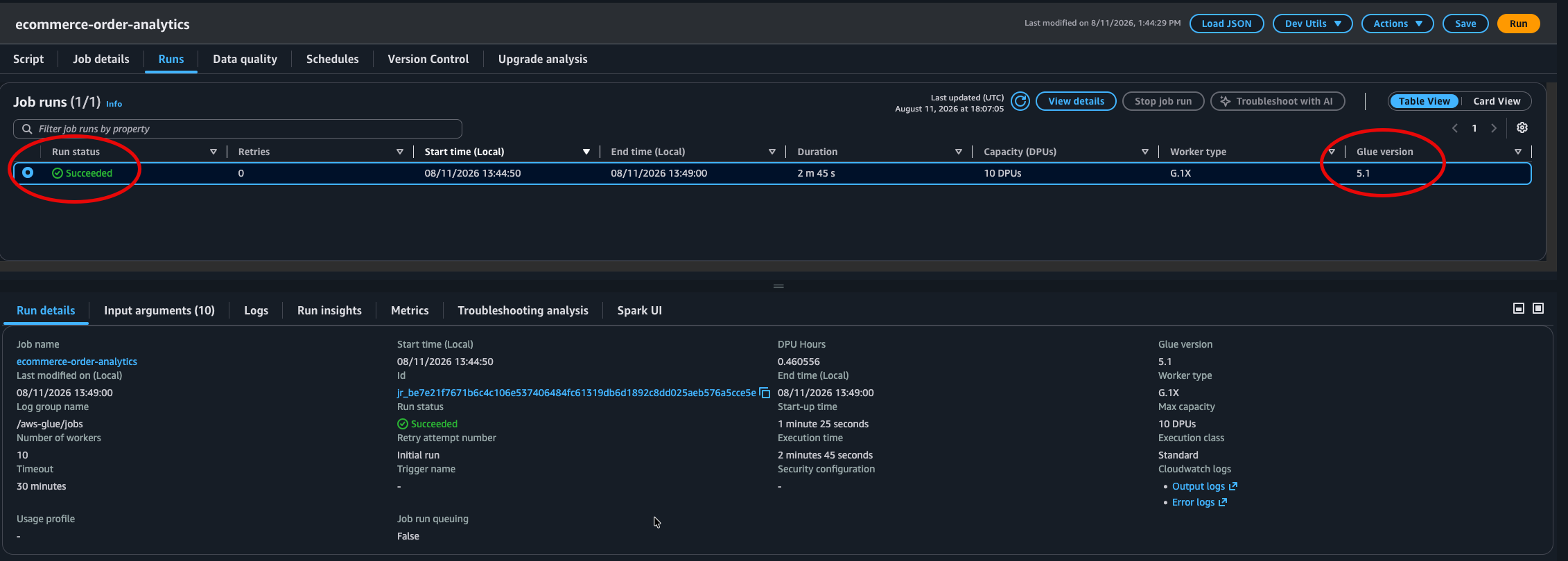
Figure 1: Job run status for the job on AWS Glue 5.1
Step 2: Start the upgrade analysis
From the job’s Actions menu, select Upgrade with generative AI. Configure the following:
- Target AWS Glue version: 6.0.
- Results S3 path: An S3 location where the analysis stores its artifacts and recommendations.

Figure 2: The Upgrade with generative AI option in the Actions menu
Configure the target AWS Glue version and the S3 results path, then choose Run.
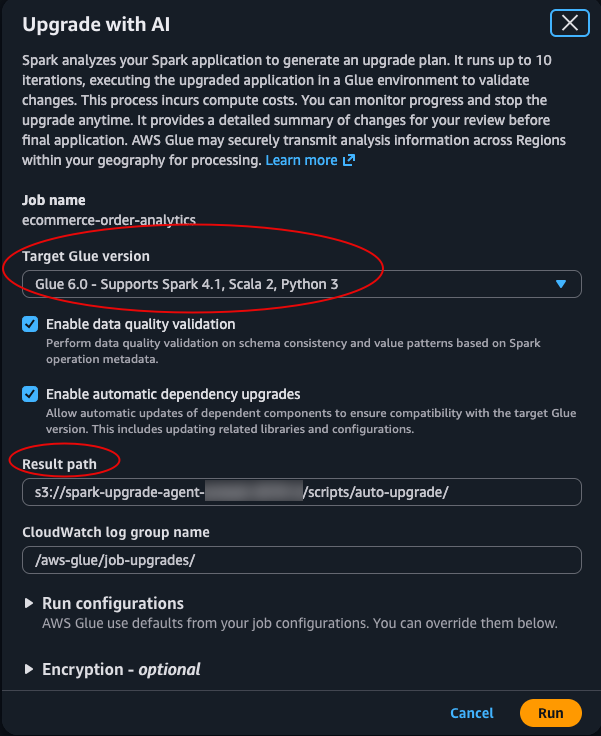
Figure 3: The Upgrade with generative AI window for setting the target AWS Glue version and results path
Choose Run. The analysis begins by running your job on AWS Glue 5.1 to establish a baseline. It then iteratively tests the job on AWS Glue 6.0, identifies failures, applies recommended fixes, and validates the job. If the upgrade analysis cannot resolve an incompatibility within its attempt budget, the analysis stops and reports the unresolved issue for manual review. Your original job remains unchanged.
Note: The upgrade analysis executes your job multiple times (one baseline run plus one or more validation attempts), and each run consumes Data Processing Units (DPUs). For large or long-running jobs, consider using the run configuration option to specify fewer workers or a smaller dataset to optimize analysis cost.
Step 3: Monitor progress
The console displays the analysis progressing through multiple validation attempts. Each attempt either succeeds or fails with a specific error, and the upgrade analysis uses that error signal to determine and apply the appropriate fix for the next attempt.
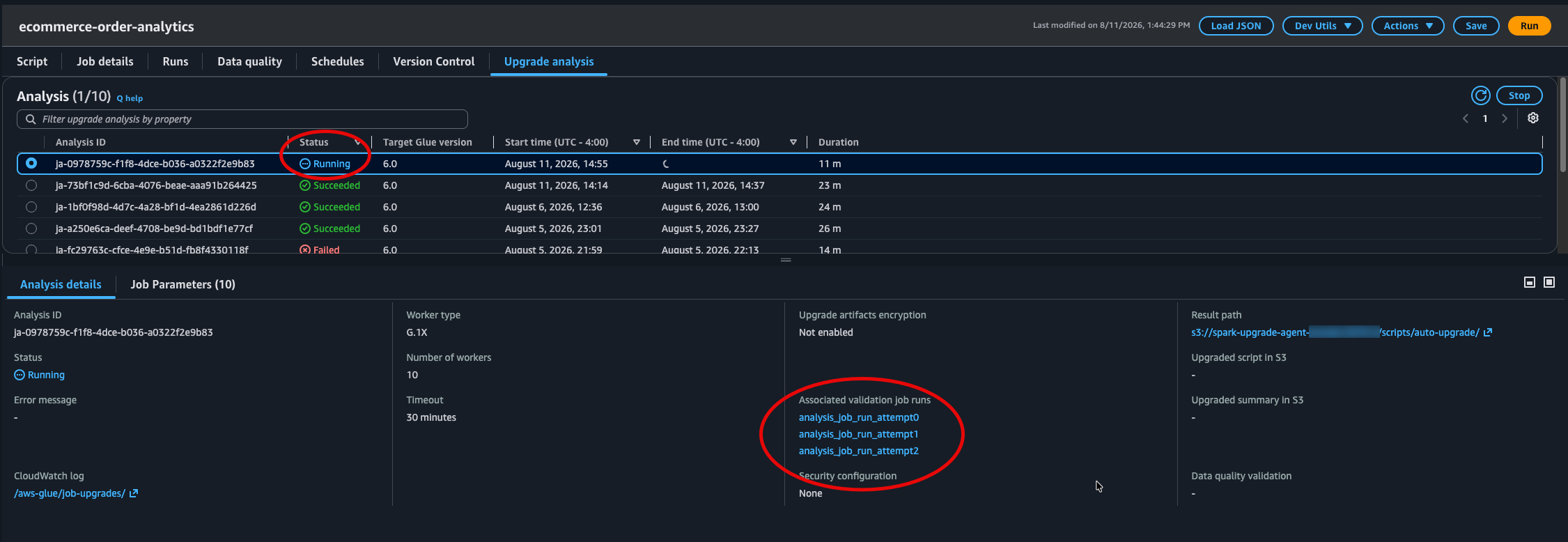
Figure 4: Upgrade analysis progress across multiple validation attempts
What the upgrade analysis found and fixed
The analysis completed in four validation attempts, identifying and resolving three distinct incompatibilities. The upgrade uses deterministic migration rules for known config changes, and automated diagnosis for runtime or code errors.
Iteration 1: Removed Parquet legacy configuration
The analysis first sanitizes any Spark configurations that were removed in Spark 4.1. Our job used spark.sql.legacy.parquet.datetimeRebaseModeInWrite and spark.sql.legacy.parquet.int96RebaseModeInWrite, which no longer exist.
Migration rule applied: The SQL configs with the spark.sql.legacy prefix were removed in Spark 4.1. They have been renamed to their non-legacy equivalents, preserving the original values.
Recommended change:
The read-side configs (datetimeRebaseModeInRead, int96RebaseModeInRead) already used the correct non-legacy names and required no changes.
However, with this fix applied, the validation run still failed because the Python module installation encountered an error on the AWS Glue 6.0 image.
Iteration 2: Python module version incompatibility
The pinned module versions (pandas==2.2.2, scikit-learn==1.5.0, numpy==1.26.4) could not be installed in the AWS Glue 6.0 Python 3.13 environment.
Error:
Recommended change: The upgrade analysis updated the version specifications from exact pins to minimum version constraints, allowing pip to resolve compatible versions for Python 3.13:
With modules installing successfully, the job launched on AWS Glue 6.0 but encountered a runtime error.
Iteration 3: ANSI mode strict type casting
Spark 4.1 enables ANSI SQL mode by default (spark.sql.ansi.enabled=true). Our revenue calculation casts string prices to double, but approximately 1.8% of records contain non-numeric placeholder values such as “N/A”, “pending”, or “null” from the upstream system. From a business perspective, this meant 1.8% of revenue orders were silently excluded from revenue metrics. This data quality issue was invisible to the original pipeline.
On AWS Glue 5.1 (ANSI mode off), cast("N/A" as double) silently returns null. On AWS Glue 6.0 (ANSI mode on), this throws an exception:
Error:
Migration rule applied: As of Spark 4.1, spark.sql.ansi.enabled is on by default. Casting a malformed value now raises CAST_INVALID_INPUT instead of returning NULL. The upgrade analysis resolved this by updating the script to use try_cast(), which safely returns NULL for malformed input while preserving ANSI mode protections for the rest of the job.
Recommended change:
Before (AWS Glue 5.1):
After (AWS Glue 6.0, fixed by the upgrade analysis):
This is a targeted fix that handles the known dirty data without disabling ANSI mode globally, keeping overflow detection and type safety active throughout the job.
Final validation and data quality check
After applying all three fixes, the analysis ran the job on AWS Glue 6.0 one final time and performed a data quality comparison between the AWS Glue 5.1 baseline output and the AWS Glue 6.0 output.
Result: The job completed successfully and all data validations passed with no mismatches detected between the source and target outputs.
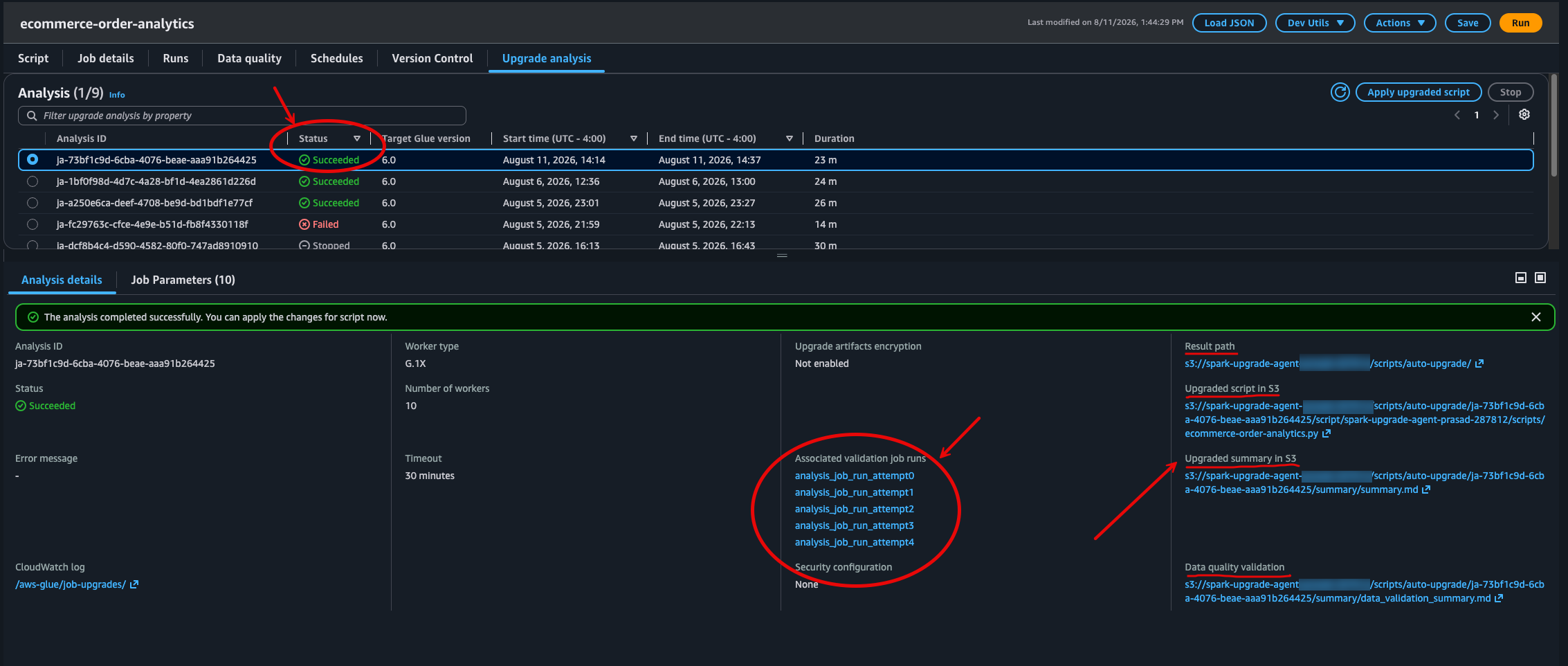
Figure 5: Final analysis status with links to the results output path in Amazon S3
Reviewing the upgrade summary
The analysis produces a detailed summary stored in your S3 results path. This summary documents each validation attempt, the errors encountered, the migration rules applied, and the recommended configuration changes:
The following is a snippet from the upgrade summary (summary.md) showing the recommended changes and validation attempt details:
The summary documents each validation attempt, the changes applied, and the data quality results.
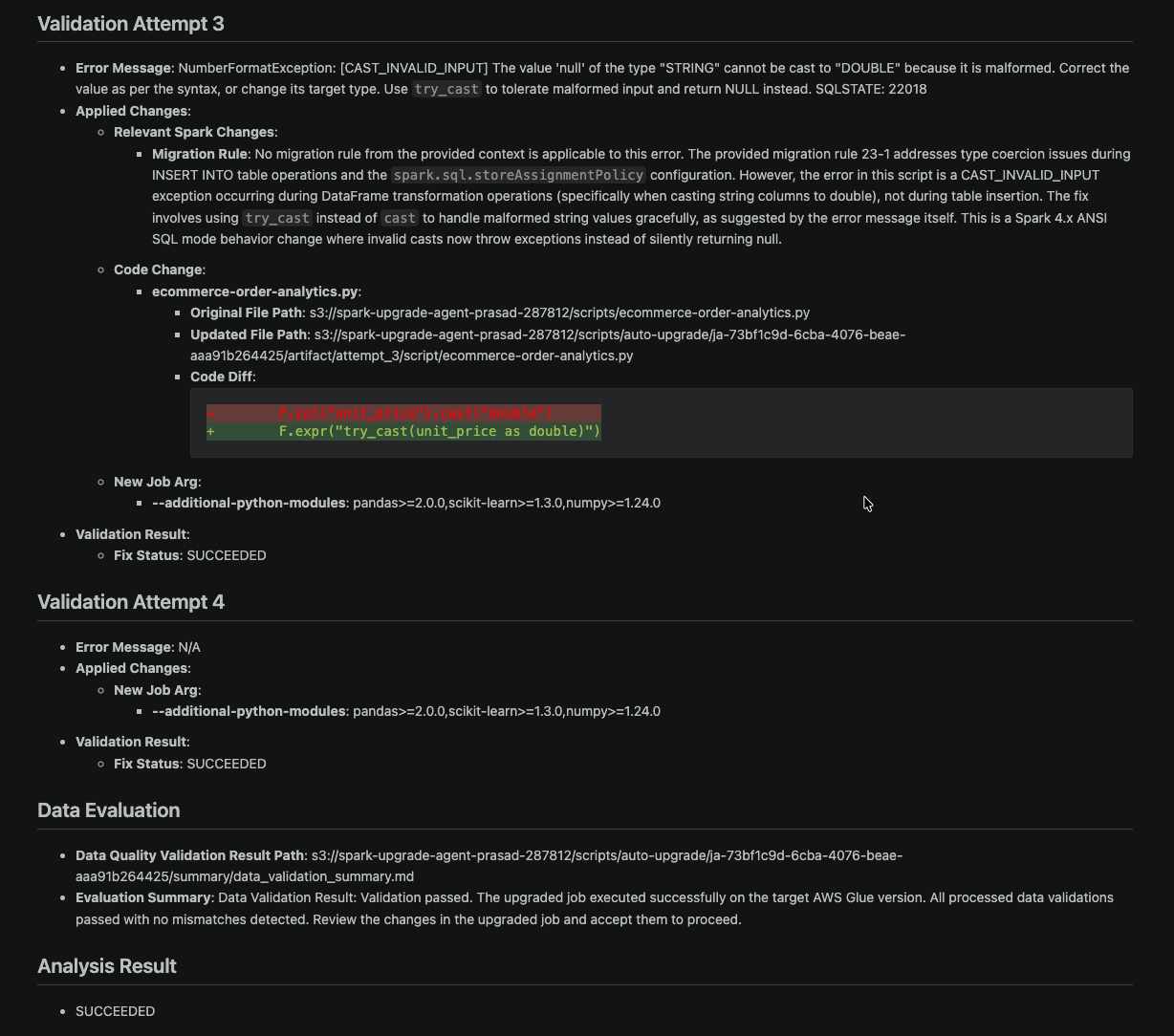
Figure 6: Upgrade summary snippet showing validation attempt details, data quality, and analysis results
After reviewing the recommendations, accept the changes to upgrade your job to AWS Glue 6.0. This updates your job definition with the recommended configuration, including the renamed Spark configs, updated module versions, and any script modifications. Because the analysis has already validated the job on AWS Glue 6.0 and confirmed data quality parity with the original, your job is ready for production.
After reviewing the recommendations, you can apply the upgraded script to your job.
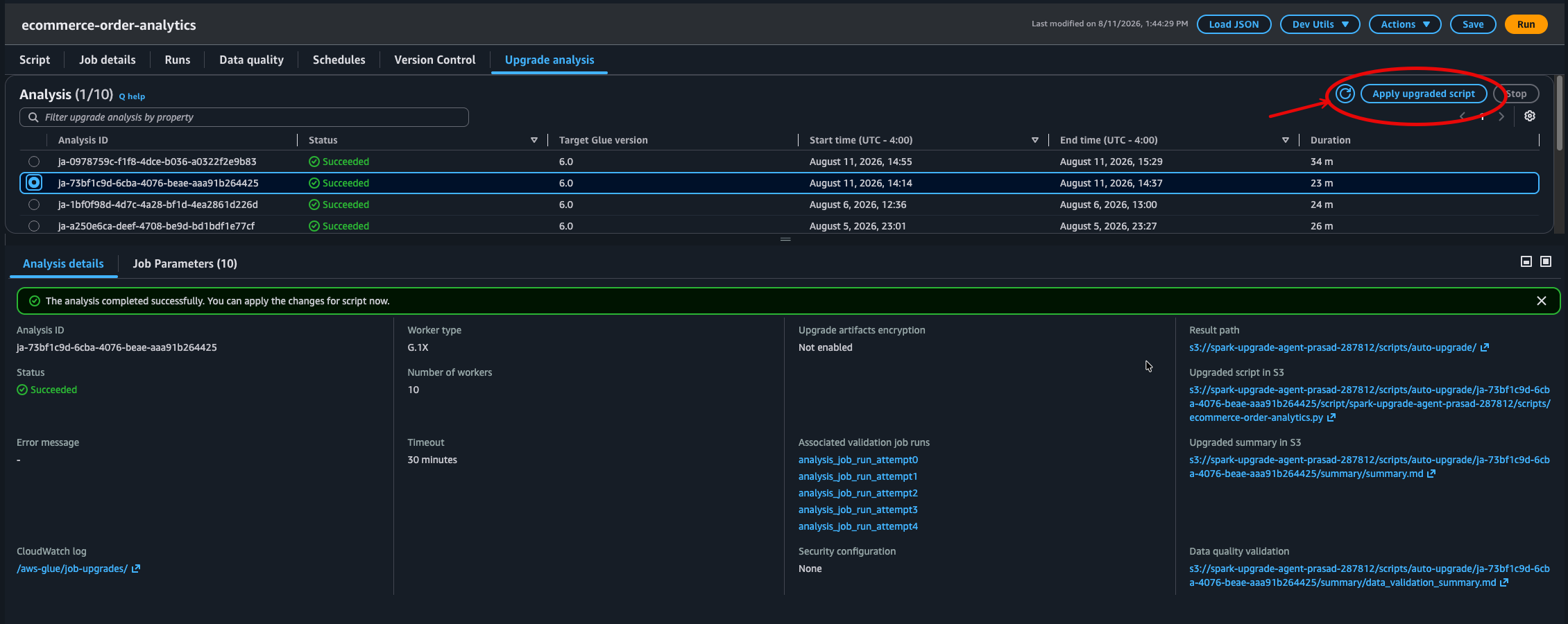
Figure 7: The option to apply the upgraded script to the job
Choose Apply to confirm the upgrade.
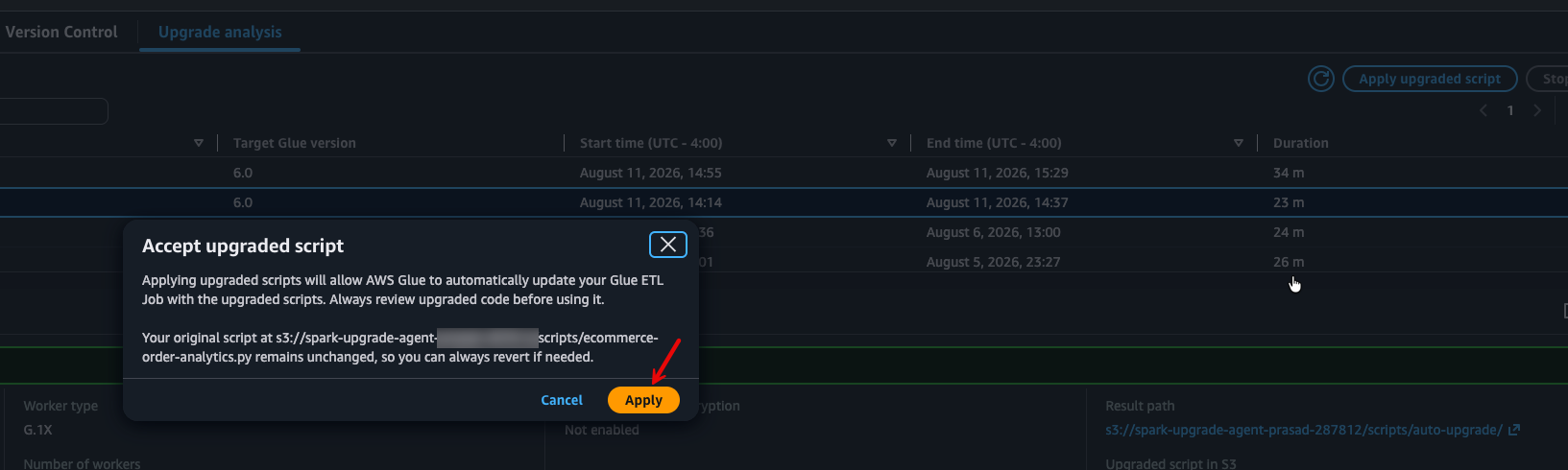
Figure 8: The Apply button that confirms upgrading the job to AWS Glue 6.0
After applying, the job definition reflects the new AWS Glue version.
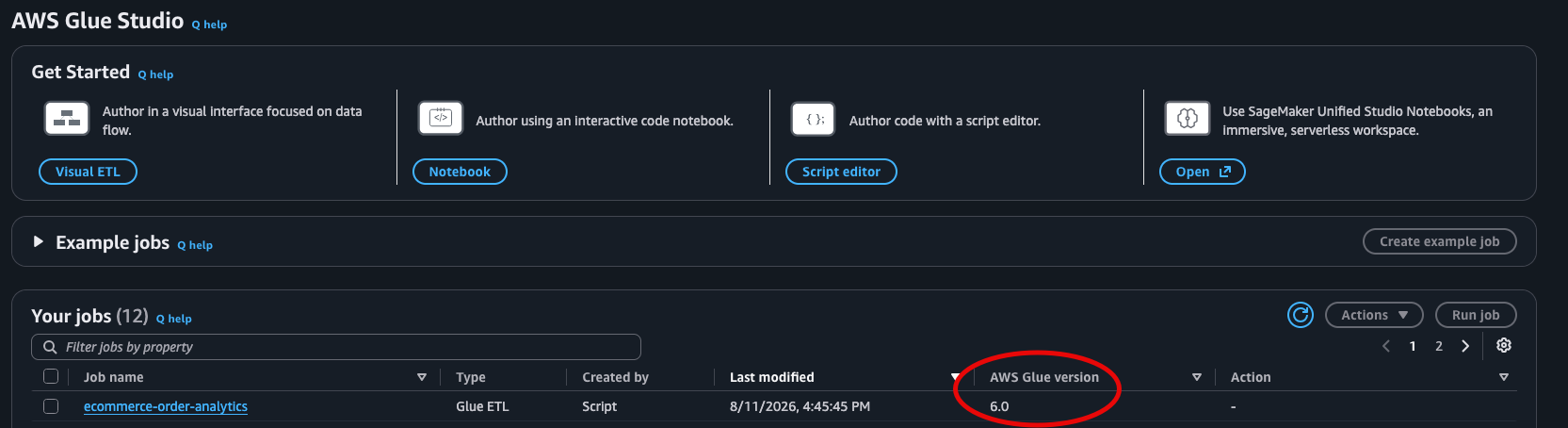
Figure 9: The AWS Glue version for the job after applying the upgrade
Python virtual environments in AWS Glue 6.0
AWS Glue 6.0 introduces --python-virtual-env-storage-prefix, a service-managed virtual environment with S3 caching that simplifies Python dependency management.
For existing jobs that use --additional-python-modules, no action is required. AWS Glue automatically handles the conversion to virtual environments when your job runs on AWS Glue 6.0. Your jobs continue to work without any changes.
For new jobs on AWS Glue 6.0, we recommend using the virtual environment approach:
How it works:
- On the first run, AWS Glue installs your modules into a virtual environment, packages it, and caches the result to your specified S3 path (approximately 15–30 seconds of additional startup time).
- On subsequent runs, AWS Glue downloads and extracts the cached virtual environment instead of running
pip install. - The cache is automatically invalidated when your module list, versions, or AWS Glue version changes.
This approach provides faster cold starts after the first run, requires no Docker image management (unlike --python-virtual-env), and is entirely service-managed with no maintenance burden.
Conclusion
The generative upgrade analysis identified and resolved three distinct compatibility issues in our AWS Glue 5.1 job, so the job now runs successfully on AWS Glue 6.0 with Apache Spark 4.1:
- The upgrade analysis renamed legacy Parquet datetime configuration keys (removed in Spark 4.1) to their current equivalents.
- The upgrade analysis updated Python module version specifications that were incompatible with Python 3.13 to use flexible minimum version constraints.
- The upgrade analysis addressed the new ANSI SQL mode default (which causes runtime failures on malformed data) with a targeted fix using
try_cast()to safely handle non-numeric values while preserving ANSI mode protections.
The analysis validated that the upgraded job produces output consistent with the original, and presented all changes as recommendations for review before applying them to your job.
Next steps
- Review the AWS Glue 6.0 documentation for the complete list of new features and changes. For a detailed walkthrough of what is new, see Introducing AWS Glue 6.0 for Apache Spark.
- Read the Apache Spark 4.1 migration for additional behavioral changes.
- Try the upgrade analysis on your AWS Glue jobs through the console.
- See the Python virtual environment documentation for detailed setup guidance.
- To reproduce this walkthrough, start with any existing AWS Glue job running on version 5.1 or earlier with a successful run history. No additional sample code or CloudFormation template is required.
After you have reviewed and accepted the upgrade changes, you can delete the analysis results stored in your S3 results path.
*Based on 3TB TPC-DS benchmark comparing AWS Glue 6.0 to AWS Glue 5.1.